Running a small business is no small feat. Juggling customers, sales, and daily operations can feel overwhelming—until you discover the game-changing power of a CRM system for small business. It’s not just for big corporations anymore.


What Is a CRM System for Small Business?

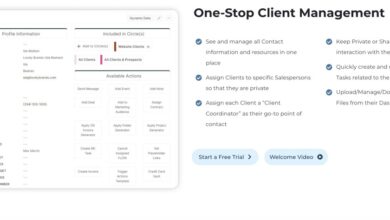
A Customer Relationship Management (CRM) system is a software tool designed to help businesses manage interactions with current and potential customers. For small businesses, this means organizing customer data, tracking sales, and improving communication—all in one centralized platform.
Core Components of a CRM
Every effective CRM system for small business includes several foundational elements that work together to streamline operations. These include contact management, sales pipeline tracking, communication logs, and reporting tools.
- Contact Management: Stores customer names, emails, phone numbers, purchase history, and notes.
- Sales Pipeline: Visualizes where each lead is in the sales process, from initial inquiry to closed deal.
- Task Automation: Automates follow-ups, reminders, and email sequences to save time.
Types of CRM Systems
Not all CRM platforms are built the same. Small businesses should understand the three main types: operational, analytical, and collaborative CRMs.
- Operational CRM: Focuses on automating sales, marketing, and service processes. Ideal for startups managing high volumes of customer touchpoints.
- Analytical CRM: Analyzes customer data to improve decision-making. Useful for businesses focused on growth through insights.
- Collaborative CRM: Enhances communication between departments like sales, marketing, and support by sharing customer interactions.
For most small businesses, an operational CRM with basic analytical features offers the best balance of functionality and affordability. Platforms like Zoho CRM and HubSpot CRM are excellent starting points.
Why Small Businesses Need a CRM System
Many small business owners assume CRM systems are only for large enterprises. But the truth is, small teams often need them more—because every customer interaction counts. A CRM system for small business helps level the playing field against bigger competitors.
Improved Customer Retention
Acquiring a new customer can cost five times more than retaining an existing one. A CRM system for small business tracks customer behavior, purchase history, and preferences, enabling personalized follow-ups that build loyalty.
For example, if a customer bought a product last month, your CRM can trigger an automated email suggesting complementary items or offering a loyalty discount. This kind of targeted engagement increases repeat sales.
Streamlined Sales Processes
Without a CRM, sales teams often rely on spreadsheets, sticky notes, or memory—leading to missed opportunities. A CRM system for small business centralizes all leads and opportunities, making it easier to prioritize follow-ups and close deals faster.
According to Salesforce’s State of Sales Report, high-performing sales teams are 1.5x more likely to use CRM tools than underperformers. The data doesn’t lie—CRM drives results.
“A CRM isn’t just a database—it’s a strategy for turning customer interactions into revenue.”
Top 7 Benefits of a CRM System for Small Business
Implementing a CRM system for small business isn’t just about organizing data—it’s about transforming how you grow. Here are seven powerful benefits that can redefine your operations.
1. Centralized Customer Data
One of the biggest challenges small businesses face is scattered information. Customer details might be in emails, notebooks, or different apps. A CRM system for small business consolidates everything into a single, searchable database.
This means your sales rep can instantly see a customer’s last purchase, support tickets, and communication history—no more asking, “Have we spoken before?”
2. Enhanced Team Collaboration
When your marketing team runs a campaign and your sales team closes leads, alignment is crucial. A CRM system for small business acts as a shared workspace where teams can log interactions, assign tasks, and track progress.
For instance, if a lead downloads an ebook, marketing can tag them as “interested in pricing,” and sales can receive an alert to follow up. This seamless handoff reduces friction and accelerates conversions.
3. Automated Workflows Save Time
Time is your most valuable resource. A CRM system for small business automates repetitive tasks like sending welcome emails, scheduling follow-ups, or updating deal stages.
Imagine setting up a workflow where every new lead gets a personalized email sequence over five days—without lifting a finger. Tools like Zapier integrate with CRMs to extend automation across your entire tech stack.
4. Better Sales Forecasting
Guessing your next quarter’s revenue is risky. A CRM system for small business provides real-time insights into your sales pipeline, helping you predict income with greater accuracy.
By analyzing deal stages, win rates, and average deal size, you can create data-driven forecasts. This is invaluable for budgeting, hiring, and scaling confidently.
5. Improved Customer Service
Customers expect fast, personalized responses. A CRM system for small business equips your support team with full context—no more transferring calls or asking customers to repeat themselves.
Features like ticket tracking, knowledge bases, and live chat integration (available in platforms like Freshsales) ensure no inquiry slips through the cracks.
6. Scalability Without Chaos
As your business grows, so does complexity. A CRM system for small business scales with you. Whether you’re adding team members, launching new products, or entering new markets, your CRM adapts.
You won’t need to rebuild your processes from scratch. Instead, you can customize fields, add automation, and generate new reports—all within the same system.
7. Data-Driven Marketing Campaigns
Generic email blasts don’t convert. A CRM system for small business allows segmentation based on behavior, demographics, and purchase history.
You can send targeted campaigns like: “Customers who bought Product A, here’s 10% off Product B.” This level of personalization boosts open rates, click-throughs, and sales.
How to Choose the Right CRM System for Small Business
With dozens of options available, selecting the right CRM system for small business can feel overwhelming. The key is to focus on your specific needs, budget, and long-term goals.
Identify Your Business Needs
Start by asking: What problems are you trying to solve? Is it poor lead tracking? Inconsistent follow-ups? Lack of sales visibility?
Create a list of must-have features. For example:
- Email integration
- Mobile access
- Reporting dashboard
- Third-party app integrations (e.g., email, calendar, accounting)
Prioritize these before comparing platforms.
Consider Budget and Pricing Models
Most CRM systems for small business offer tiered pricing. Some, like HubSpot CRM, have a free forever plan with robust features. Others charge per user per month.
Watch out for hidden costs like onboarding fees, add-on modules, or overage charges. Calculate the total cost of ownership over 12–24 months to make a fair comparison.
Evaluate Ease of Use and Onboarding
The best CRM is the one your team will actually use. A complicated interface leads to low adoption and wasted investment.
Look for platforms with intuitive dashboards, drag-and-drop pipeline management, and mobile apps. Check if they offer free trials, onboarding support, and training resources.
For example, Insightly is known for its user-friendly design, making it ideal for non-technical teams.
Top 5 CRM Systems for Small Business in 2024
Not all CRM platforms are created equal. Based on features, pricing, and user feedback, here are five of the best CRM systems for small business this year.
1. HubSpot CRM
HubSpot CRM is a top choice for small businesses due to its powerful free plan and seamless integration with marketing, sales, and service tools.
- Pros: Free forever plan, intuitive interface, excellent email tracking, strong automation.
- Cons: Advanced features require paid upgrades.
- Best for: Startups and growing businesses focused on inbound marketing.
Learn more at HubSpot’s official site.
2. Zoho CRM
Zoho CRM offers deep customization and AI-powered insights at a competitive price.
- Pros: Affordable pricing, AI assistant (Zia), workflow automation, multi-channel communication.
- Cons: Interface can feel cluttered for beginners.
- Best for: Small businesses needing scalability and advanced automation.
Explore plans at Zoho CRM.
3. Salesforce Essentials
Salesforce, the global CRM leader, offers a simplified version for small businesses.
- Pros: Trusted brand, robust reporting, mobile app, integration with thousands of apps.
- Cons: Higher price point, steeper learning curve.
- Best for: Small businesses planning rapid growth and enterprise-level features.
Visit Salesforce Essentials for details.
4. Freshsales (by Freshworks)
Freshsales combines CRM with built-in phone, email, and chat for a complete sales suite.
- Pros: Clean UI, AI-based lead scoring, activity capture, real-time engagement.
- Cons: Limited third-party integrations compared to HubSpot or Zoho.
- Best for: Sales-driven small businesses wanting all-in-one communication.
Check it out at Freshsales.
5. Insightly
Insightly excels in project and contact management, making it ideal for service-based businesses.
- Pros: Project tracking, relationship linking, easy customization.
- Cons: Reporting features are basic in lower tiers.
- Best for: Consultants, contractors, and agencies managing client projects.
Learn more at Insightly.
Common CRM Implementation Mistakes to Avoid
Even the best CRM system for small business can fail if implemented poorly. Avoid these common pitfalls to ensure success.
Lack of Team Training
Rolling out a CRM without proper training leads to frustration and low adoption. Invest time in onboarding sessions, video tutorials, and ongoing support.
Assign a CRM champion on your team to answer questions and encourage usage.
Over-Customization Too Early
While customization is powerful, overdoing it at launch can delay adoption. Start with basic settings and evolve as your team gets comfortable.
For example, don’t create 20 custom fields on day one. Begin with essential data like name, email, company, and deal stage.
Ignoring Data Quality
Garbage in, garbage out. If your CRM is filled with outdated or duplicate contacts, it loses value.
Regularly clean your database. Use deduplication tools and set rules for data entry. Encourage team members to update records after every interaction.
How to Maximize ROI from Your CRM System for Small Business
Installing a CRM is just the beginning. To get the most value, you need a strategy for ongoing optimization.
Set Clear Goals and KPIs
Define what success looks like. Is it a 20% increase in lead conversion? A 30% reduction in response time? Track these KPIs in your CRM dashboards.
Regularly review performance and adjust your processes accordingly.
Integrate with Other Tools
A CRM works best when connected to your email, calendar, accounting software, and marketing tools.
For example, integrating your CRM with Mailchimp allows you to sync contacts and track campaign performance. Use Zapier or native integrations to connect your ecosystem.
Use Reporting to Drive Decisions
Don’t just collect data—use it. Generate monthly reports on sales performance, customer acquisition cost, and team activity.
Spot trends: Are certain lead sources more valuable? Which sales reps close the most deals? Use these insights to refine your strategy.
What is a CRM system for small business?
A CRM system for small business is a software platform that helps manage customer interactions, track sales, automate tasks, and improve customer service. It centralizes data to boost efficiency and growth.
Is a CRM worth it for small businesses?
Yes. A CRM system for small business improves organization, increases sales, enhances customer satisfaction, and provides valuable insights—all of which contribute to long-term success.
What is the best free CRM for small business?
HubSpot CRM offers the most robust free plan, including contact management, email tracking, deal pipelines, and basic automation—ideal for startups and small teams.
How much does a CRM system for small business cost?
Prices vary. Free plans (like HubSpot) are available. Paid plans typically range from $12 to $50 per user per month, depending on features and scalability.
Can a CRM help with marketing?
Absolutely. A CRM system for small business supports marketing by enabling email campaigns, lead segmentation, behavior tracking, and campaign performance analytics.
Choosing and implementing a CRM system for small business is one of the smartest moves you can make. It transforms chaos into clarity, guesswork into strategy, and effort into results. Whether you’re a solopreneur or a growing team, a CRM gives you the tools to build stronger relationships, close more deals, and scale with confidence. The key is to start simple, stay consistent, and continuously optimize. With the right system and mindset, your small business can achieve big things.
Further Reading: